The Challenge
Nearly every IT project needs identity management. Users must register, sign in, recover accounts, verify email or phone, manage sessions, and—increasingly—complete multi-factor authentication. Yet building this from scratch is deceptively complex: credential hashing and storage, session handling, CSRF protection, rate limiting, account recovery flows, MFA integration, OIDC and OAuth2 wiring—the list goes on.
Mistakes are easy when you are not a security expert. A weak hashing algorithm, a missing CSRF token, or a flawed session invalidation strategy can open the door to account takeover or data breach. Fixing such issues after the fact is expensive, both in engineering time and in reputation.
In 2026, there is no need to write custom identity code. Use battle-tested solutions.
Why Ory Kratos: Flexibility and Enterprise Fit
Ory Kratos is a self-hosted identity and user management system that handles the full spectrum of authentication and self-service flows. Unlike opinionated SaaS products, Kratos gives you control over schemas, credential types, delivery channels, and—via hooks—custom logic at pre- and post-flow points.
Where Kratos Fits: Identity, Not OAuth
Some readers may assume Kratos is an OAuth2 or OIDC provider—it is not. Here is the distinction:
- Kratos is an identity and user management system. It handles registration, login, sessions, recovery, verification, and MFA. It answers: “Who is this user?” Your app or API validates sessions by calling Kratos’s Who Am I endpoint.
- Ory Hydra is the separate Ory project that implements an OAuth2 and OpenID Connect provider. Hydra issues access tokens, refresh tokens, and ID tokens (JWTs). It answers: “Grant this client access to that resource.”
Kratos does not issue JWT tokens. It uses session tokens—opaque identifiers stored in Kratos and validated via GET /sessions/whoami. Your backend forwards the X-Session-Token or Cookie to Kratos; Kratos returns the session and identity. No JWT signing, no token introspection of JWTs.
You can use Kratos alone for apps that need simple session-based auth (browser cookies or a session token for native clients). When you need OAuth2/OIDC—for example, to let third-party apps obtain access tokens on behalf of users—you add Hydra and connect it to Kratos. Hydra delegates authentication to Kratos; Kratos handles the actual login and identity, Hydra handles the OAuth2 flows and token issuance.
Multiple Credential Types
Kratos supports the credential types you need for modern applications (see the Credentials documentation):
- password — Traditional username/email + password
- code — One-time codes via email or SMS (passwordless)
- passkey — WebAuthn-based passwordless authentication
- oidc — Social login (Google, GitHub, etc.) and enterprise IdPs
- saml — B2B SSO
- totp, webauthn, lookup_secret — Second factors for MFA
Each identity can have multiple credential types. An identity might have both a password and an OIDC credential, or both email+code and phone+code—each credential type uses unique identifiers.
Self-Service Flows
Registration, login, recovery, verification, settings, and logout are all first-class flows. You configure UI URLs, lifespans, and post-flow hooks. Recovery and verification can use code (email/SMS) or other methods. Settings flows support privileged sessions and AAL enforcement.
Native and Browser Flows
Kratos exposes both browser flows (cookie-based sessions for web apps) and API flows (session token for native apps—CLI, mobile, desktop). Your backend validates sessions by calling GET /sessions/whoami with either a Cookie or an X-Session-Token header.
Hands-On Demo: Phone + SMS Passwordless
I have put together a demo that shows Kratos configured for phone + SMS OTP auth, with a native Go TUI client to prove that auth works outside the browser.
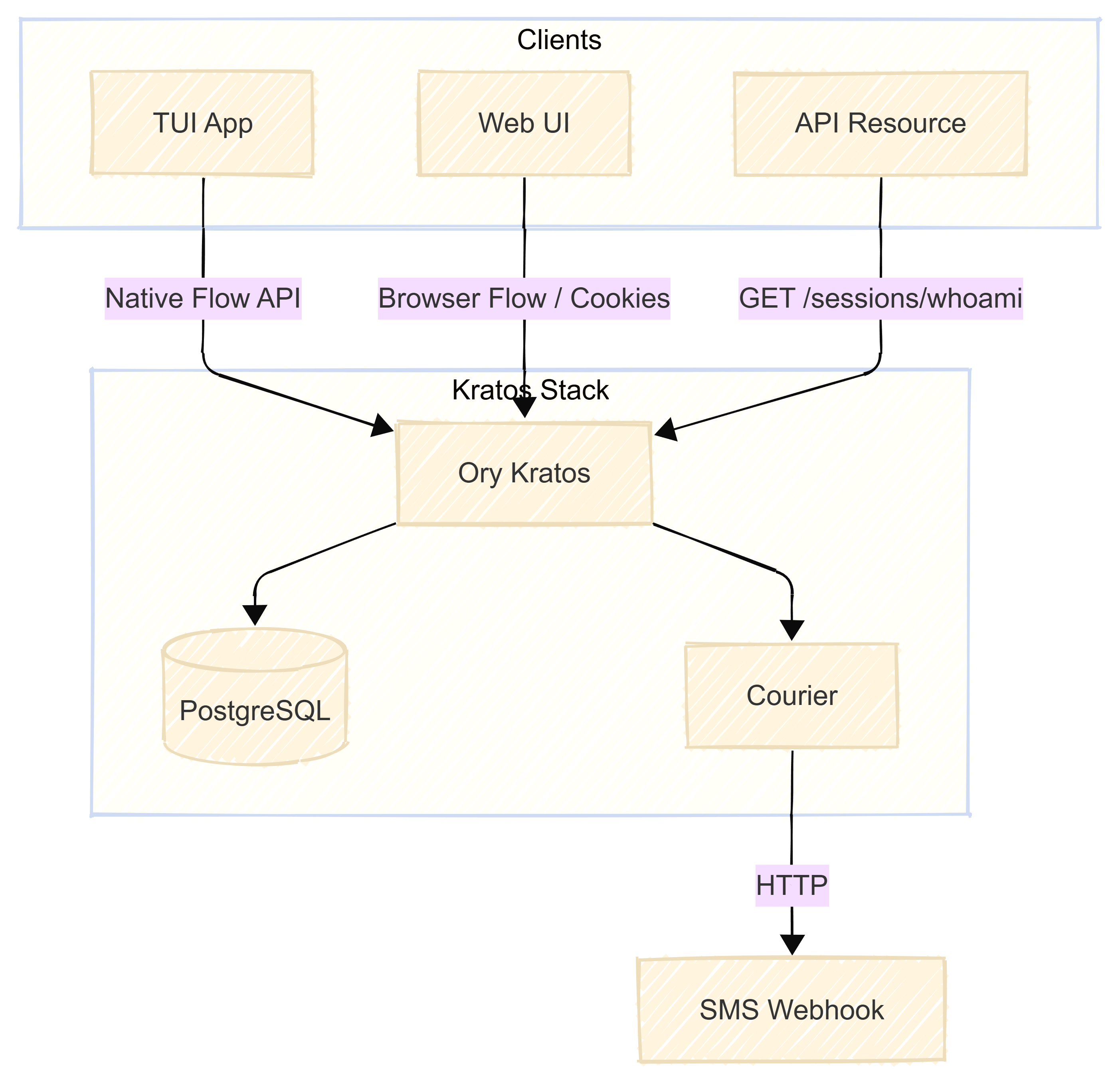
Architecture
flowchart TB
    subgraph clients [Clients]
        TUI[TUI App]
        WebUI[Web UI]
        API[API Resource]
    end

    subgraph kratos_stack [Kratos Stack]
        Kratos[Ory Kratos]
        Postgres[(PostgreSQL)]
        Courier[Courier]
    end

    TUI -->|Native Flow API| Kratos
    WebUI -->|Browser Flow / Cookies| Kratos
    API -->|GET /sessions/whoami| Kratos

    Kratos --> Postgres
    Kratos --> Courier
    Courier -->|HTTP| Webhook[SMS Webhook]
- Kratos — Central auth; registration, login, session management
- PostgreSQL — Persistent storage for identities and sessions
- Courier — Sends OTP via HTTP webhook (e.g. webhook.site for dev, Twilio for prod)
- TUI App — Go application using the Native Flow API; no browser required
- Web UI — Kratos reference UI for browser-based flows
- API Resource — Any backend service that validates sessions via
GET /sessions/whoami
Identity Schema
The demo uses a phone-SMS identity schema. The phone trait is the identifier; the ory.sh/kratos annotations configure the code credential via SMS, and recovery/verification via SMS:
{
  "traits": {
    "phone": {
      "ory.sh/kratos": {
        "credentials": { "code": { "identifier": true, "via": "sms" } },
        "verification": { "via": "sms" },
        "recovery": { "via": "sms" }
      }
    }
  }
}
Flows Demonstrated
| Flow | Steps |
|---|---|
| Sign up | Phone → OTP sent via webhook → user enters code → session created |
| Sign in | Same flow for returning users |
| Who am I | GET /sessions/whoami with X-Session-Token; returns session and identity JSON |
Browser and Native Clients
Kratos provides APIs for both browser-based flows (cookie-backed sessions) and native clients (CLI, mobile, desktop). The demo includes a web UI and a native Go TUI—I focused on the native implementation because I work mostly with mobile applications. With the Native Flow API, the flow returns a session_token that the client stores and sends as X-Session-Token on subsequent requests. Any API that protects resources can forward this header to Kratos’s Who Am I endpoint—200 means authenticated, 401 means not.
Sequence: Passwordless Registration
sequenceDiagram
    participant User
    participant TUI
    participant Kratos
    participant Courier
    participant Webhook

    User->>TUI: Choose Sign up
    TUI->>Kratos: POST /self-service/registration/api
    Kratos-->>TUI: flow_id
    User->>TUI: Enter phone
    TUI->>Kratos: POST /self-service/registration (phone)
    Kratos->>Courier: Send OTP
    Courier->>Webhook: POST (SMS body)
    Kratos-->>TUI: 422 continue
    User->>TUI: Enter OTP
    TUI->>Kratos: POST /self-service/registration (code)
    Kratos-->>TUI: session_token
Quick start:
docker-compose up -d
cd native-client && go build -o native-client . && ./native-client
Multiple Flows and Dynamic Schema Selection
One of Kratos’s strengths is identity schema selection. You can define multiple schemas and let clients choose which one to use at registration or login time.
How It Works
Schemas are JSON Schema documents that define identity traits and how they map to credentials. You mark schemas as selfservice_selectable: true in configuration. Clients then append the identity_schema query parameter when starting a flow:
- Browser:
GET /self-service/registration/browser?identity_schema=schema-b - API:
GET /self-service/registration/api?identity_schema=schema-b
If no schema is specified, the default schema is used.
Use Cases
- Multi-tenant or multi-profile: Different schemas for different apps or user segments (e.g. B2B vs B2C)
- Multiple auth paths: Schema A = email + password, Schema B = phone + code, Schema C = email + code—your client picks the appropriate schema for the context
- Dynamic choice: A single app can offer multiple sign-in options and choose the schema based on user selection
See the Identity Schema Selection documentation for configuration details.
Configurable Delivery: Email and SMS
Kratos does not lock you into a specific email or SMS provider. The Courier component handles message delivery and supports pluggable channels.
Email delivery uses SMTP. You configure your own server (or a relay like AWS SES, SendGrid) and override templates via courier.templates. Each template can load content from: a URL (http:// or https://), a local file (file://), or inline base64-encoded text (base64://)—you pick one per template. Internationalization is supported using identity traits.
SMS via HTTP Webhook
SMS delivery is HTTP-based. You configure a webhook URL that Kratos calls when it needs to send an OTP. The URL can point to Twilio, Plivo, AWS SNS, or your own microservice.
Body templates use Jsonnet. The context object (ctx) exposes:
ctx.recipient— Phone numberctx.body— Rendered message bodyctx.template_data— Data such asLoginCode,VerificationCode,RecoveryCodectx.template_type— e.g.login_code,verification_code,recovery_code
You shape the request body to match your provider’s API. Example courier configuration:
courier:
  channels:
    - id: sms
      type: http
      request_config:
        url: ${SMS_WEBHOOK_URL}
        method: POST
        body: base64://<your-jsonnet-template>
        headers:
          Content-Type: application/json
The base64 payload decodes to a Jsonnet function that maps recipient and body to your HTTP payload. For development, tools like webhook.site let you inspect the outgoing requests without configuring a real SMS provider.
See Send SMS to your users for full configuration options.
One Limitation: Password as Second Factor
A practical constraint: when using passwordless auth (code/SMS or passkey as the primary credential), password cannot be used as a second factor.
Kratos supports multi-factor authentication with a first factor (password, code, or passkey) and a second factor. According to the MFA documentation, the supported second factors are:
- TOTP — Time-based one-time passwords from authenticator apps
- WebAuthn — When configured with
passwordless: false, used as a second factor - Lookup secrets — Recovery codes for 2FA backup
Password is a first-factor credential. It is not available as a second factor. So:
- Password + TOTP — Supported
- Code (SMS) + TOTP — Supported
- Code (SMS) + password — Not supported; password cannot be the second factor
- Passkey + password — Not supported in the same way; passkey is passwordless, password is first-factor only
If you run phone+SMS passwordless and want MFA, add TOTP or WebAuthn as the second factor—not password.
Extensibility: Pre- and Post-Flow Hooks
Kratos welcomes custom logic—not by reinventing auth, but through hooks at well-defined points in each flow. Kratos hooks let you trigger webhooks (or built-in actions) before or after registration, login, recovery, verification, and settings updates.
Typical use: you have a profiles database or ElasticSearch that must stay in sync with identities. When a user registers or logs in, you need to upsert their profile. Hooks are the right place for that—no polling, no background jobs. Kratos calls your webhook with the identity (ctx.identity), you insert or update the record, and the flow continues.
sequenceDiagram
    participant Client
    participant Kratos
    participant BeforeHook as before hook
    participant AfterHook as after hook
    participant External as Your Systems

    Client->>Kratos: POST /self-service/registration/api
    Note over Kratos: flow starts
    Kratos->>BeforeHook: execute before hooks
    BeforeHook->>External: HTTP webhook - invite check, IP validation
    External-->>BeforeHook: 200 OK
    BeforeHook-->>Kratos: continue
    Kratos-->>Client: flow_id, UI nodes

    Client->>Kratos: POST credentials
    Note over Kratos: validate, create identity
    Kratos->>AfterHook: execute after hooks
    AfterHook->>External: webhook with ctx.identity
    Note over External: sync to Profiles DB, ElasticSearch, CRM
    External-->>AfterHook: 200 OK
    AfterHook-->>Kratos: done
    Kratos-->>Client: session_token
Before hooks run when the user starts a flow. Use them to enforce invite-only registration, validate IP or domain, or gate access. After hooks run when the flow completes successfully. Use them to:
- Insert or update the user in your profiles database
- Index the user in ElasticSearch for search
- Push to CRM (HubSpot, Mailchimp) or analytics (Segment, Mixpanel)
- Revoke other sessions on login (built-in
revoke_active_sessions)
Hooks are configured per flow and per method. For example, you can run one webhook after password registration and another after OIDC registration. The webhook receives ctx.identity, ctx.flow, and ctx.request_headers; you shape the payload with Jsonnet and point it at your HTTP endpoint.
Note on after-hook failures: With the default response.parse: false, after-hooks run after Kratos persists the identity. If your webhook fails (timeout, 5xx), the identity exists in Kratos but not in your external system (e.g. ElasticSearch)—you get split state. Use response.ignore: true to run webhooks asynchronously so the user flow is not blocked, and consider a reconciliation job to sync identities when webhooks fail.
See the Kratos hooks documentation and configuration reference for self-hosted setup. Configure web_hook in your kratos.yml under selfservice.flows.*.before.hooks and after.hooks.
What Else Kratos Supports
Beyond what we covered, Kratos offers:
- MFA enforcement — Configure
required_aal(e.g.highest_available) so users with a second factor must complete it - OIDC — Social and enterprise identity providers
- WebAuthn / Passkeys — Passwordless or second-factor; phishing-resistant
- Recovery and verification — Configurable flows with code delivery via courier
See the Kratos documentation for the full feature set.
Conclusion
Ory Kratos is flexible enough for most enterprise identity scenarios. Multiple schemas, credential types, delivery channels, and pre/post-flow hooks let you design auth flows that fit your product—without reinventing the wheel. Hooks are where you plug in your custom logic: sync to profiles DB, index in ElasticSearch, push to CRM. The main constraint to be aware of: when using passwordless auth, password cannot serve as a second factor; use TOTP or WebAuthn instead.
If you are evaluating identity solutions in 2026, give Kratos a serious look. Explore the demo, dive into the docs, and avoid the expensive mistake of custom auth.
Questions or feedback? Reach out:
- Email: pm@martavoi.by
- GitHub: github.com/martavoi
- LinkedIn: dzmitrymartavoi
Further Reading:
- Ory Kratos Documentation
- Kratos Hooks — Pre/post registration, login, and more
- Ory Hydra — OAuth2 and OIDC provider; use with Kratos when you need JWT/access tokens
- Kratos Credentials
- Identity Schema Selection
- Configure MFA in Kratos
- Send SMS to your users