The Problem
Throughout my experience working with Kafka, I’ve constantly faced the same challenge: how do you delay message processing?
Common scenarios:
- Retry logic: “Try again in 5 minutes if this fails”
- Business workflows: “Execute this action in 1 hour”
- Scheduled tasks: “Send this notification tomorrow at 9 AM”
Kafka doesn’t have this natively. You can’t just write:
// ❌ This doesn't exist in Kafka
client.Produce(message, delay: 5 * time.Minute)
The Challenge: Common Workarounds and Their Issues
The typical solutions all have significant drawbacks:
Database + Cron Job Approach
This is the most common pattern, but it comes in two problematic flavors:
Shared Database: Creating a scheduled_messages table in a shared PostgreSQL database violates fundamental microservices principles. You’ve coupled all your services through a shared data store, creating a single point of contention and failure.
Per-Service Database: Each service maintains its own scheduled_tasks table with polling logic. This means implementing the same solution multiple times, each slightly different, and hammering your databases with polling queries every minute.
Consumer Sleep Pattern
Reading messages, checking timestamps, and sleeping if too early sounds simple – but it blocks your entire consumer group and causes lag to accumulate.
Multiple Topics Strategy
Creating separate topics like retry-5min, retry-10min, retry-1hour with dedicated consumers is inflexible. What happens when you need a 7-minute delay?
External Schedulers (Quartz, Temporal)
These are powerful, battle-tested tools. But for the simple case of delaying a Kafka message, you’re introducing a new system with its own API, writing bridge code between the scheduler and Kafka, and context-switching between event-driven and scheduled architectures.
I wanted something simpler – a Kafka-native solution that any service can use without architectural compromises.
The Solution: kafka-timebridge
I built kafka-timebridge – a Go daemon that implements delayed message delivery for Kafka. It’s as simple as producing a regular message, but with two headers:
// Regular Kafka message
producer.Produce(&kafka.Message{
    TopicPartition: kafka.TopicPartition{
        Topic: kafka.StringPtr("timebridge"),  // Send to timebridge topic
    },
    Headers: []kafka.Header{
        {Key: "X-Delayed-Until", Value: []byte("2025-02-01T15:00:00Z")},  // When to deliver
        {Key: "X-Delayed-Topic", Value: []byte("orders-processing")},     // Where to deliver
    },
    Value: []byte(`{"order_id": 12345}`),
})
That’s it. The message gets delivered to orders-processing topic at the specified time.
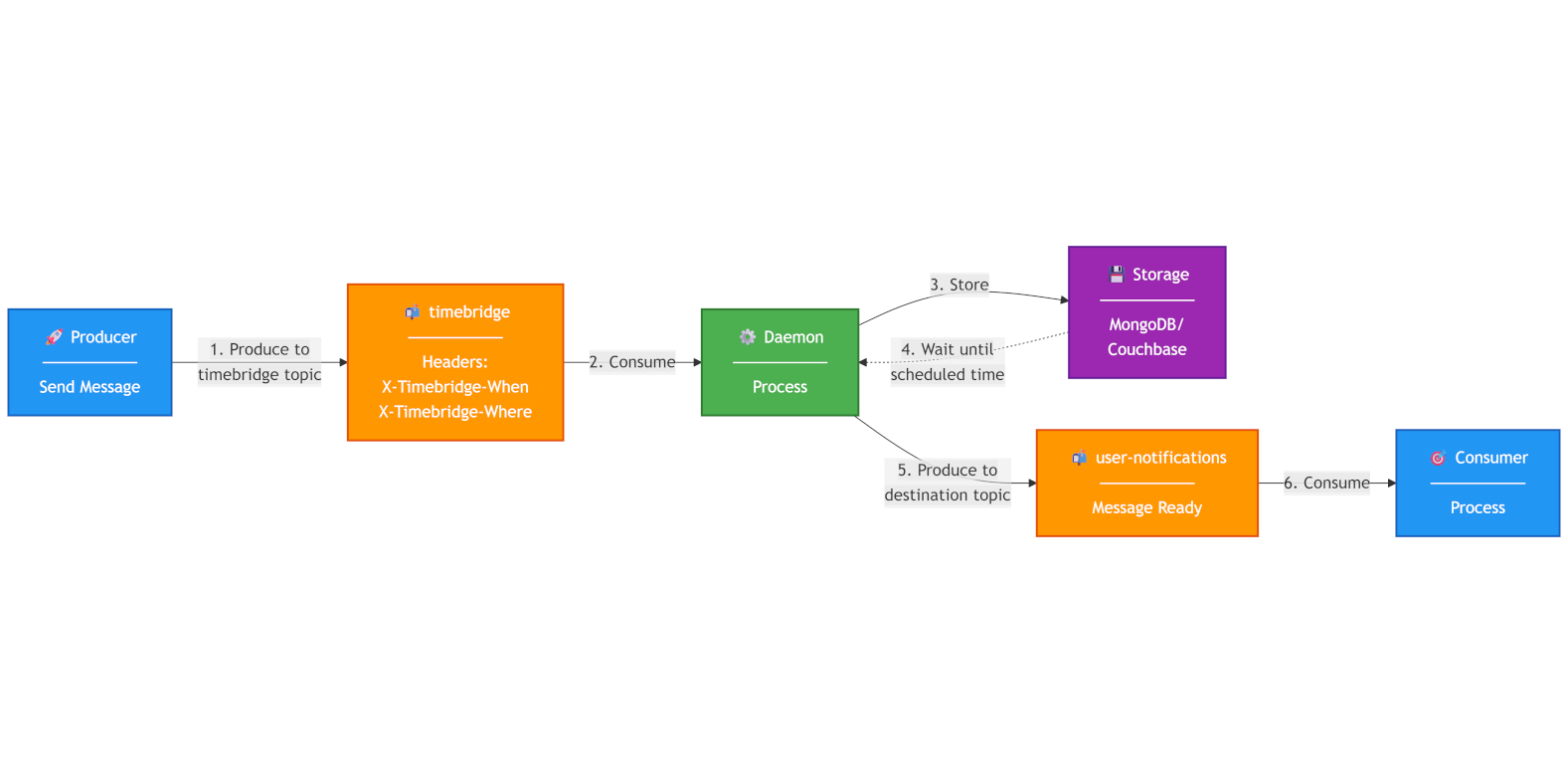
How It Works
- Produce a message to the
timebridgetopic with delay headers - timebridge daemon receives it, stores it (MongoDB, Couchbase, or in-memory)
- Scheduler polls for messages whose time has come
- Delivers to the destination topic automatically
The architecture is intentionally simple. Simple means fewer things that can break, easier troubleshooting at 3 AM, and boring technology that just works.
Why This Approach Works
- ✅ No code changes – just change the topic name and add headers
- ✅ Durable – backed by MongoDB or Couchbase (or in-memory for testing)
- ✅ Scalable – stateless daemon, can run multiple instances
- ✅ Reliable – survives restarts, handles failures gracefully
- ✅ Simple – one binary, minimal configuration
Kafka-Native Design
If you already have Kafka in your infrastructure, kafka-timebridge fits naturally. No new concepts to learn. No explaining to security why you need another API key. It’s just Kafka with two extra headers.
Stateless Operation
The daemon itself is stateless. You can scale horizontally, kill instances, restart them – state lives in your storage backend. This makes deployment and operations straightforward.
Open Source and Free
MIT licensed. No usage tiers. No “contact sales for enterprise features.” Just docker-compose up and you’re running.
Configuration and Operational Features
kafka-timebridge is designed to be flexible and production-ready out of the box.
Flexible Storage Backend Configuration
Choose the storage backend that fits your infrastructure:
- MongoDB
- Couchbase
- In-memory (for development/testing)
Each backend is fully configurable through environment variables or configuration files, making it easy to adapt to your existing infrastructure.
Operational Controls
Fine-tune the daemon’s behavior to match your requirements:
- Topic Name: The
timebridgetopic name is configurable – use any topic name that fits your naming conventions - Timeouts: Configure connection timeouts, read/write timeouts for storage and Kafka
- Log Levels: Adjust logging verbosity from debug to production-level logging
- Polling Intervals: Control how frequently the scheduler checks for due messages
Error Handling
Robust error handling ensures reliability in production:
- Error Topic: Optionally configure an error topic where message scheduling errors are published. This allows you to monitor failures, build alerting, and implement custom error recovery workflows – all while maintaining visibility through standard logging.
- Retry Policies: Built-in retry mechanisms handle temporary networking issues gracefully. Transient failures don’t result in lost messages.
These operational features mean kafka-timebridge isn’t just a proof of concept – it’s built for production environments where reliability and observability matter.
Real-World Use Cases
Since building this, I’ve used kafka-timebridge for:
Payment Retry Logic
- Failed payment? Schedule retry in 5 minutes
- Still failed? Exponential backoff: 10 minutes, 30 minutes, 1 hour
- No more “database table full of scheduled tasks”
Email Scheduling
- Queue newsletter for 9 AM Tuesday
- User timezone conversions handled cleanly
- “Send password reset email in 15 minutes if user doesn’t confirm” scenarios
Workflow Orchestration
- Multi-step business processes with delays between steps
- “Order confirmed, start shipping process in 2 hours”
- No state machines required, just messages
Rate Limiting
- API cooldown periods
- “User can retry this action in 1 hour”
- Let Kafka handle the scheduling logic
When to Use (and When Not to Use)
kafka-timebridge is ideal when:
- 90% of what you need is “delay Kafka messages”
- You want to stay in the event-driven/Kafka ecosystem
- You prefer simple, Kafka-native APIs over external schedulers
- You’re already running Kafka and want minimal additional infrastructure
Consider alternatives when:
- Complex workflows: Need task dependencies, DAGs, or complex orchestration? Use Temporal or Airflow.
- Scheduling non-Kafka tasks: If you’re scheduling database jobs, API calls, or other non-message tasks, you need a proper scheduler.
- You already have a scheduler: If Temporal or Quartz is already running in your stack and your team knows it well, use that instead.
Technical Limitations:
- Precision: Checks every few seconds, not millisecond-perfect. If you need atomic-clock precision, this isn’t the tool.
- Storage Required: In-memory mode exists but isn’t for production. You’ll need MongoDB or Couchbase for durability.
- Kafka-only: Can only deliver to Kafka topics. Can’t trigger arbitrary code execution.
Getting Started
Docker image is available:
docker pull ghcr.io/martavoi/kafka-timebridge
# Configure via environment variables
docker run -e KAFKA_BROKERS=localhost:9092 ghcr.io/martavoi/kafka-timebridge
For production deployments, Docker Compose examples, configuration options, and full documentation: github.com/martavoi/kafka-timebridge
Future Plans
The project is actively maintained, and I’m planning to expand its capabilities:
Additional Storage Backends
- PostgreSQL support – for teams already running PostgreSQL who want to avoid adding MongoDB or Couchbase
- MySQL support – another popular option for teams with existing MySQL infrastructure
These additions will make kafka-timebridge even more accessible to teams with different database preferences, while maintaining the same simple Kafka-native API.
If you have suggestions or want to contribute, the project is open source and welcomes contributions: github.com/martavoi/kafka-timebridge
Final Thoughts
Kafka is powerful, but delayed message delivery shouldn’t require complex workarounds. kafka-timebridge solves this with a simple, reliable daemon that fits naturally into your existing Kafka infrastructure.
If you’ve been struggling with delayed processing in Kafka, give it a try: github.com/martavoi/kafka-timebridge
For a more casual, dev-friendly take on this topic, check out my Medium post: Kafka Doesn’t Do Delayed Messages. This Does.
Questions or feedback? Reach out:
- Email: pm@martavoi.by
- GitHub: github.com/martavoi
- LinkedIn: dzmitrymartavoi
Tags: #kafka #go #architecture